
Call Center Analytics Software That Drives Smarter Decisions
Turn every conversation into actionable data, so your team makes faster decisions, coaches smarter, and grows revenue with confidence.

Step Inside CloudTalk’s
Call Analytics
We’ve helped thousands of global companies
Case studies featuring customers who are building faster.

Global Sales Engine Powered by Connected Conversations
“CloudTalk’s AI transcripts and analytics make it easier to track talk ratios, discovery depth, and regional performance—all without requiring formal training to get started.”
Read case study
Revolutionizing Revolut’s Efficiency and Saving 40+ Hours
“Thanks to CloudTalk’s reliability, we could improve sales teams’ performance and close more deals than we could have ever imagined.”
Read case study
Increasing productivity for 200 customer support agents
“With CloudTalk’s Analytics I now get to see every step of the way. We can find discrepancies and gain a much better understanding of our teams.”
Read case study
Delivering success for Glovo’s customer support team
“CloudTalk improved our team’s cost and efficiency. The script feature allows us to lead the calls in a much more systematic way.”
Read case studyWhat Is Call Center Analytics?
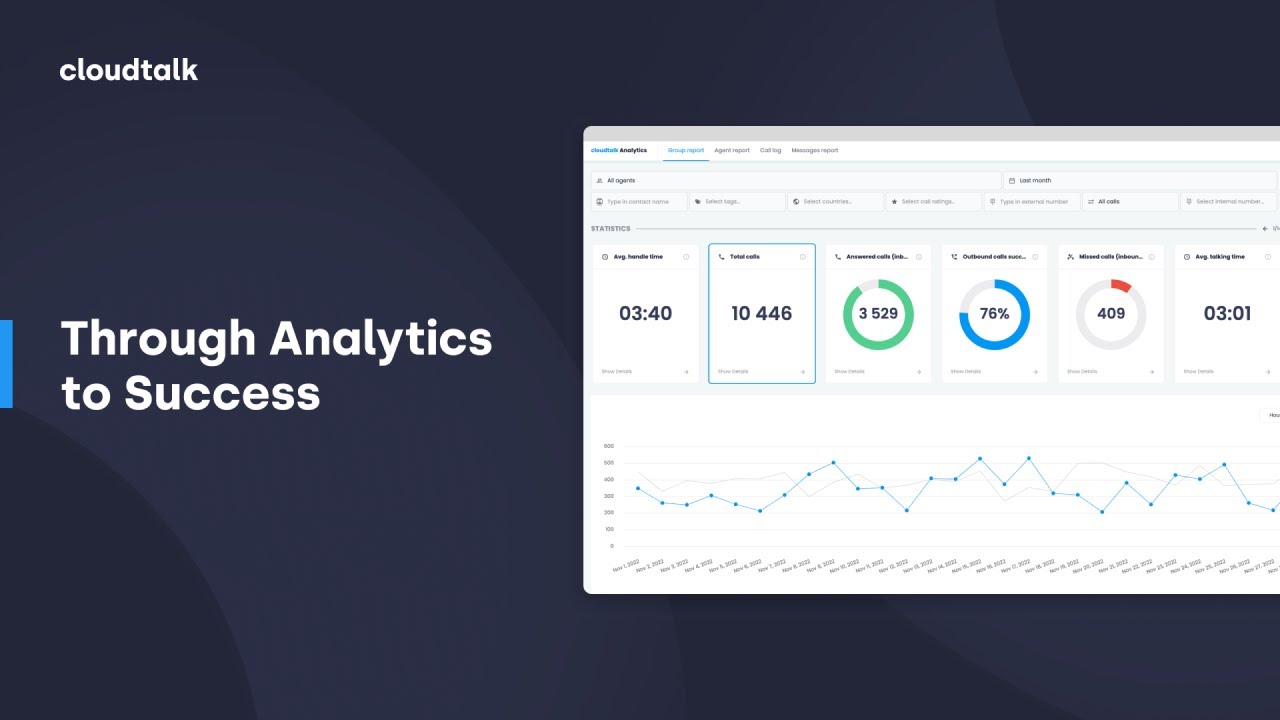
Imagine having a complete understanding of your call center’s performance at your fingertips. Analytics makes this a reality. Its customizable dashboard synthesizes all your data, offering a real-time, panoramic view of your operations.
From the nitty-gritty of inbound and outbound call flows to the performance of individual agents and teams, every detail is accessible. See precisely how long customers wait, understand the volume of missed calls, and gain insight into agent effectiveness.
Actionable Insights
Use Call Analytics Software to Hit Every KPI
Leverage real-time analytics to enhance performance and drive smarter decision-making.
Unlock Growth With Key Metrics
Understanding the right metrics is essential for optimizing operations and improving customer interactions. CloudTalk’s Analytics provides deep insights into key performance metrics, helping you make data-driven decisions with ease. Here are some of them:
- Outbound Call Success Rate: Measures the percentage of outbound calls that successfully connect with a recipient, helping assess outreach effectiveness.
- Average Total Talk Time: Tracks the total time agents spend actively speaking with customers, reflecting engagement levels and efficiency.
- Call Abandonment Rate: Shows the percentage of calls where customers hang up before reaching an agent, indicating potential wait-time issues.
- Average Handling Time (AHT): The total time spent on a call, including talk time and after-call work, helping evaluate agent productivity.

Take Analytics Further with AI Call Intelligence
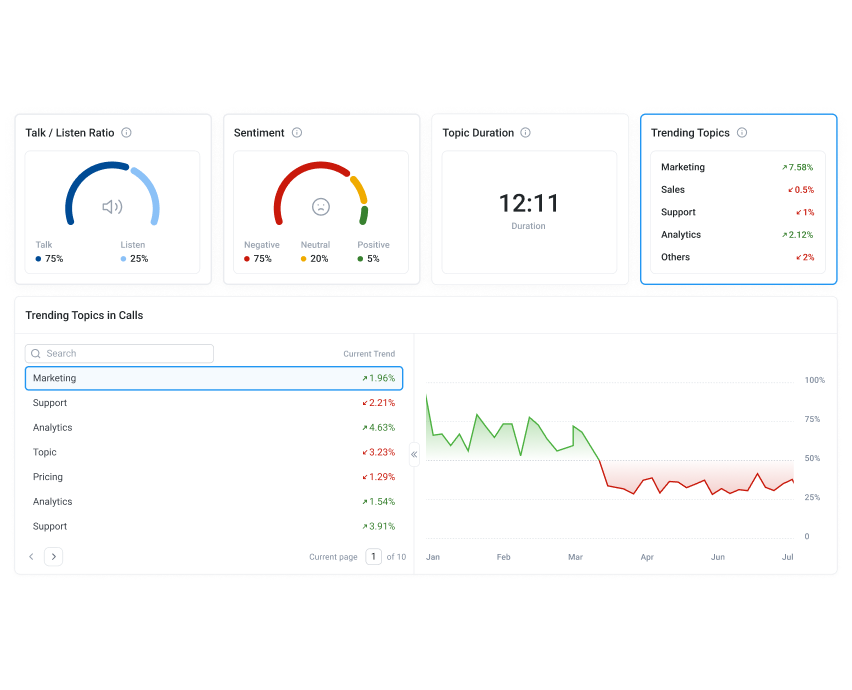
AI takes analytics beyond the numbers, uncovering hidden patterns and delivering real-time intelligence. With CloudTalk AI Call Intelligence, teams gain a deeper understanding of customer behavior—what customers are actually feeling and talking about on every call.
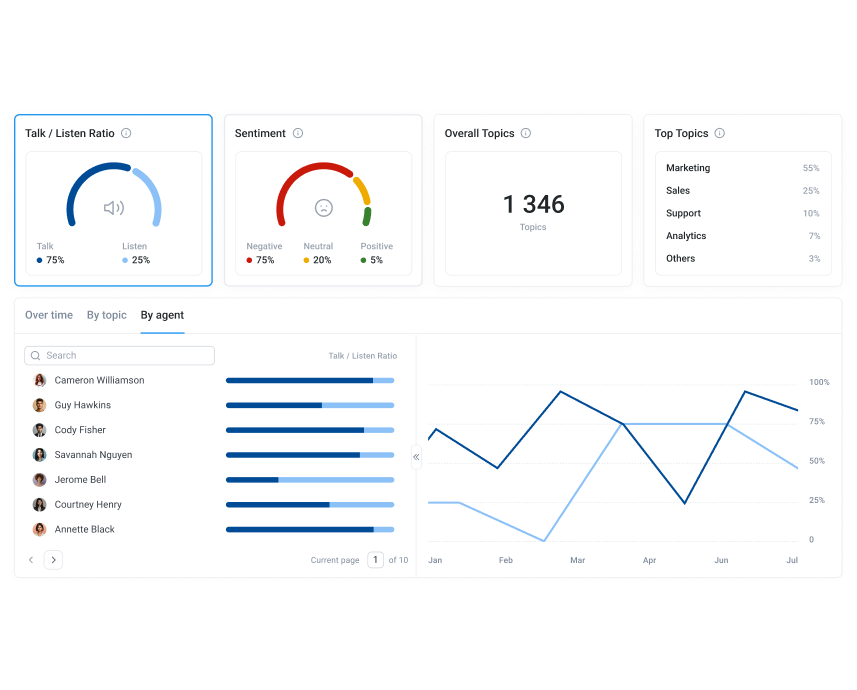
Instantly grasp the emotional tone of every conversation with Sentiment Analysis, pinpoint emerging customer concerns with AI Trending Topics, and optimize agent communication with Talk/Listen Ratio insights. These aren’t just data points—they’re actionable pathways to better customer experiences and lower operational costs.
How to Set Up Call Center Analytics in CloudTalk?
- Log in to CloudTalk and access Analytics via the dashboard.
- Choose a report type (Group, Agent, Call Log, Messages).
- Customize and explore data by adjusting filters or clicking on data points for deeper insights.
- Track each call’s journey, helping you understand call flow and improve system efficiency.
- You can also export data via CSV or PDF.
Features
Other features you might like

Group Reporting
Give your managers full visibility over their team’s performance, and the tools to identify what, when and how to improve.

Wallboard
Showcase real-time performance and call center metrics to your entire team — live and in a variety of different formats.

Agent Reporting
Track your agents’ performance directly in CloudTalk and optimize for the best customer experience possible.

Real-Time Dashboard
Monitor agent or group activity in real time, from phone calls and performance metrics to their general availability.
Call Center Analytics Software — Everything You Need to Know
Call Center Analytics Software: Common Questions Answered
From key features and buying criteria to GDPR compliance and driving team adoption—here are the questions businesses ask most before choosing call center analytics software.
What are the key features of call center analytics software?
Key features of call center analytics software include real-time reporting, AI-driven insights, and conversation analysis that help businesses improve customer experience and agent performance. A cloud-based solution collects data from calls, recordings, and integrated CRMs, turning every interaction into actionable intelligence.
Core features to look for in call center analytics software include:
- Real-time dashboards: monitor live metrics such as call volume, service levels, and queue performance to make staffing adjustments instantly.
- Historical reporting: review long-term KPIs like first-call resolution, average handle time, and call outcomes over time.
- Conversation Intelligence: automatically transcribe calls, detect sentiment, and extract topics to surface customer needs and coaching opportunities.
- Agent performance tracking: analyze talk-to-listen ratios, wrap-up times, and call quality to identify where coaching has the most impact.
- CRM and helpdesk integrations: sync call data with tools like Salesforce, HubSpot, and Zendesk for a 360° customer view.
- API exports and BI integrations: connect CloudTalk Analytics to platforms like Power BI, Tableau, or Google Data Studio for deeper visualization.
What are the key benefits of using call analytics software?
Key benefits of using call analytics software include better customer experiences, higher agent productivity, and smarter business decisions. With CloudTalk Analytics and Conversation Intelligence, teams move beyond surface-level metrics and uncover insights directly from conversations.
- Improve customer experience: detect recurring issues, monitor sentiment trends, and address pain points before they escalate.
- Enhance agent performance: use transcripts, AI summaries, and talk/listen ratios to deliver precise, data-backed coaching.
- Optimize staffing efficiency: forecast demand, balance agent workloads, and reduce idle time across queues.
- Enable data-driven decisions: access clear dashboards and topic trends to identify where processes need refinement.
- Reduce costs: lower churn and training overhead by solving problems early and targeting coaching where it matters most.
How do you choose the best call analytics software for your business?
Choosing the best call analytics software comes down to usability, data depth, AI-powered insights, and compliance readiness. The right tool makes analytics actionable for both managers and front-line agents—not just data teams.
Key factors to evaluate when comparing call center analytics software:
- Reporting depth: ensure coverage of real-time dashboards, historical KPIs, and campaign-level detail, not just summary numbers.
- AI-powered Conversation Intelligence: prioritize solutions that include call transcription, sentiment analysis, and topic extraction—not just call logging.
- Integration ecosystem: confirm compatibility with your CRM and helpdesk so call data flows automatically into the tools your team already uses.
- Ease of use: dashboards that require an analyst to interpret won’t be used by front-line managers—look for customizable, intuitive interfaces.
- Compliance readiness: confirm GDPR, HIPAA, and regional regulation support for safe data handling before signing any contract.
- Scalability: adopt a cloud-based system that can grow with your team and call volume without requiring re-implementation.
How do you use data analytics from call center software to improve performance?
Getting value from call center data analytics software starts with knowing which metrics matter for your goals. Most teams begin with high-level KPIs—call volume, abandonment rate, average handle time—then drill deeper into agent-level and campaign-level data over time.
Practical steps to use call center data analytics effectively:
- Set a baseline first: export your current metrics and identify your biggest performance gaps before making changes—otherwise you have no way to measure improvement.
- Segment by team and agent: group-level data tells you where the problem is; agent-level data tells you who needs coaching and on what specific behavior.
- Use AI summaries instead of listening to recordings: AI-generated call summaries let you spot patterns across hundreds of calls in minutes rather than hours.
- Act on trends, not outliers: a single bad call is an exception; the same issue appearing across 30% of calls is a process problem that needs fixing.
- Close the loop: use insights to update scripts, retrain agents, and adjust routing—then measure the impact in the next reporting cycle.
Is call center analytics software GDPR compliant?
GDPR compliance is a critical requirement for any business using call center analytics software to process personal data. Under GDPR, call recordings, transcripts, and customer interaction data are classified as personal data—meaning businesses must have a lawful basis for processing them, inform customers when calls are being recorded, and store data securely with defined retention periods.
CloudTalk is built with data protection at its core. It is certified to ISO 27001 and SOC 2, and compliant with GDPR, HIPAA, and PCI-DSS. Key compliance features include:
- Configurable data retention policies: define exactly how long recordings and analytics data are stored and when they are automatically deleted.
- Automatic call recording disclosures: play consent announcements via IVR before a call connects—no manual agent steps required.
- Role-based access controls: restrict access to recordings and transcripts so only authorized team members can view sensitive call data.
- Data export and deletion: honor subject access requests and right-to-erasure obligations with built-in data management controls.
Full details of CloudTalk’s security and compliance practices are available on the security page. For jurisdiction-specific guidance, always consult your data protection officer or legal counsel.
How do you increase adoption of call analytics software across your team?
Low adoption is the most common reason call analytics software delivers less value than expected. The data is available—but if managers and agents aren’t reviewing dashboards or acting on reports, the investment stalls. The fix is behavioral, not technical.
- Start with one metric per role: give agents their talk-to-listen ratio, give managers call abandonment rate. One clear number is more motivating than a full dashboard nobody reads.
- Connect analytics to goals agents already care about: frame insights in terms of handle time, FCR, or call quality scores—not abstract data points.
- Make data visible: use the Wallboard to display live performance metrics on screen. When numbers are public, teams engage with them.
- Celebrate wins with data: when analytics show improvement, call it out by name—positive reinforcement builds the habit of checking performance data regularly.
- Build it into 1:1s and team reviews: managers who use call analytics data in coaching sessions normalize the tool for the whole team over time.
What call analytics software features matter most for customer service teams?
Customer service teams have different analytics priorities than sales teams. Where sales focuses on outbound success rates and conversion tracking, support teams need to minimize wait times, resolve issues on the first call, and maintain consistent quality at scale.
The most valuable call analytics features for customer service include:
- First Call Resolution (FCR) tracking: the single most important metric for support—knowing what percentage of issues resolve without a callback tells you everything about efficiency and customer effort.
- Queue and wait-time analytics: real-time visibility into hold times and queue depth lets supervisors shift resources before customers hang up and abandon.
- Sentiment Analysis: understanding whether customer mood is improving or deteriorating across a call helps prioritize coaching and surface systemic service issues.
- Agent performance reporting: individual-level data on handle time, talk-to-listen ratio, and call outcomes helps managers give targeted feedback instead of generic advice.
- Group and campaign reporting: comparing performance across teams or queues highlights where training, routing, or staffing changes will have the biggest impact on service quality.
Integrations
Connect Your Call Analytics Software to 100+ Favorite Tools
CRMs, helpdesks, applicant tracking systems and more. Get started instantly with 100+ built-in integrations, or expand further with Zapier, Make or CloudTalk’s own workflow automation builder.


Ready to get started?
Join over 5,500+ modern companies that already trust CloudTalk to have MORE and BETTER calls.
Frequently asked questions
The main types of call center analytics are:
– Operational performance analytics: monitors metrics like response times and issue resolution.
– Customer interaction analytics: assesses conversation quality and customer satisfaction.
– Predictive analytics: uses data to forecast trends and future behaviors.
– Speech analytics: extracts insights from calls using voice recognition to enhance the experience.
Call center analytics collects data from phone systems to track call times and agent performance. This data helps companies make better decisions, like scheduling staff and improving customer service.
Call center analytics focus only on phone call data, while contact center analytics analyze multiple communication channels like email, chat, and social media.
To analyze call center data, collect key information like call recordings, surveys, and agent performance metrics. Track essential metrics and use the insights to improve operations, train agents, and enhance the overall customer experience.
Call center analytics helps businesses improve customer service and performance. Analytics also supports data-driven decision-making, leading to cost savings, higher customer satisfaction, and increased revenue.
Track call center productivity by monitoring metrics like First Call Resolution (FCR), Average Handle Time (AHT), and occupancy rates. Use analytics tools to automate reports and combine data with agent and customer feedback. Regular reviews ensure alignment with business goals.
Call center performance metrics are divided into two types:
– Overall Call Center Metrics: track the efficiency of the entire center, such as service level and customer satisfaction.
– Agent Performance Metrics: focused on individual productivity, including average handle time (AHT), adherence to schedule, and first response time.
Yes—leading call analytics software like CloudTalk is built to meet GDPR, HIPAA, and PCI-DSS requirements. This includes configurable data retention policies, secure cloud storage, automated call recording consent disclosures, and role-based access controls. CloudTalk is also ISO 27001 and SOC 2 certified. For full details, visit CloudTalk’s security and compliance page, and consult your data protection officer for jurisdiction-specific guidance.
Start by connecting analytics to goals agents already care about—handle time, FCR, or call quality scores. Display live metrics using the Wallboard so performance data is visible to the whole team. Build data review into regular 1:1s and team meetings, celebrate measurable wins when metrics improve, and keep dashboards focused on one or two meaningful numbers per role rather than overwhelming everyone with a full reporting suite at once.
Start by identifying your biggest performance gaps—high abandonment rates, long handle times, or low FCR. Segment data by agent and team to pinpoint where coaching is needed. Use AI call summaries and transcripts to review patterns across hundreds of calls without listening to each one manually. Act on trends rather than individual outliers, and measure the impact of every change you make before moving on to the next improvement.
For customer service, the highest-value call analytics features are FCR tracking, queue analytics to monitor wait times in real time, Sentiment Analysis to catch customer frustration early, and agent-level performance reporting for targeted coaching. Group reporting is also essential for comparing performance across queues and teams to identify where routing or staffing adjustments will have the most impact on service quality.
The best call analytics software combines real-time dashboards, historical KPI reporting, AI-powered conversation intelligence (transcription, sentiment, topic extraction), CRM integration, and compliance controls in a single platform. Prioritize ease of use—analytics that require an analyst to interpret won’t be used by front-line managers. CloudTalk includes all of these capabilities, plus call scoring and agent reporting, with no complex setup required.

Still have questions?
Can’t find the answer you’re looking for? Please chat to our friendly team.


